

In today’s competitive job market, crafting a resume that stands out to employers is crucial. However, before your CV can impress hiring managers, it needs to pass through an Applicant Tracking System (ATS). These systems filter applications based on keywords and formatting, ensuring only the most relevant candidates reach the hiring manager’s desk. Here’s a step-by-step guide on how to test your CV for ATS compatibility, make it job-winning, and ensure it is plagiarism-free.
Thank you for reading this post, don't forget to subscribe!You can check your CV here for ATS
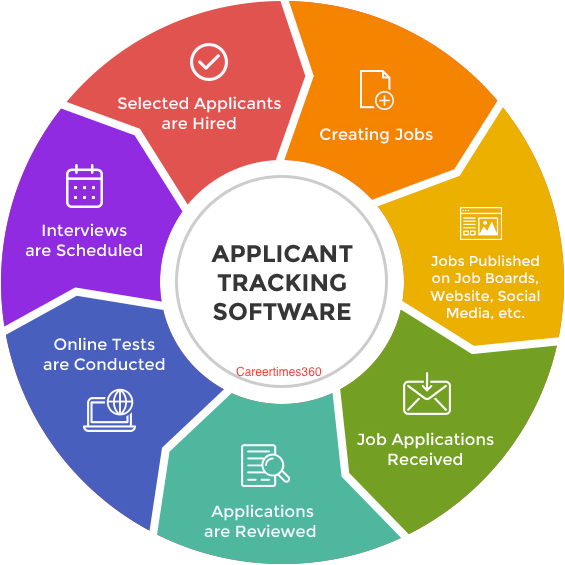
Understanding ATS and Its Importance
An ATS is software used by employers to manage the recruitment process. It scans resumes for specific keywords related to the job description, filtering out those that don’t match. Therefore, an ATS-friendly CV is essential for getting noticed in the first round of screening.

Steps to Test Your CV for ATS Compatibility
- Use Standard Headings: Ensure your CV uses standard section headings like “Work Experience,” “Education,” and “Skills.” Avoid creative titles that might confuse the ATS.
- Incorporate Relevant Keywords: Tailor your resume to include keywords from the job description. Tools like Jobscan can help match your CV’s content with the job listing.
- Choose a Simple Format: Stick to a clean, simple format. Use standard fonts like Arial or Times New Roman and avoid graphics, images, and complex tables that can confuse ATS software.
- Save in the Right Format: Save your CV as a .docx or .pdf file. Some ATS software can’t read .pdf files, so check the employer’s preference.
- Run an ATS Check: Use online ATS testing tools to scan your CV. These tools will identify areas for improvement and help ensure your resume passes through ATS filters.
Making Your CV Job-Winning
- Highlight Achievements: Focus on accomplishments rather than just listing job duties. Use quantifiable results to demonstrate your impact.
- Customize for Each Job: Tailor your CV for each application, adjusting keywords and skills to match the job description closely.
- Professional Summary: Include a concise professional summary at the top of your resume that highlights your key skills and experiences relevant to the job.
- Action-Oriented Language: Use strong action verbs to describe your duties and achievements. Words like “led,” “developed,” “implemented,” and “achieved” can make your resume more dynamic.
Ensuring Your CV is Plagiarism-Free
- Original Content: Write your resume from scratch, ensuring it reflects your unique skills and experiences.
- Plagiarism Checkers: Use online plagiarism detection tools like Grammarly or Copyscape to scan your CV for any unintentional copied content.
- Cite Sources: If you use specific industry terms or definitions, ensure you paraphrase or properly cite the sources to maintain originality.

Testing your CV for ATS compatibility is a crucial step in the job application process. By incorporating relevant keywords, using a simple format, and customizing your resume for each job, you increase your chances of passing through ATS filters and catching the eye of hiring managers. Additionally, ensuring your CV is plagiarism-free by writing original content and using plagiarism detection tools will maintain your integrity and professionalism. Follow these tips to create an ATS-friendly, job-winning resume that helps you land your dream job.